LLM files
Plain-text copies of your docs for coding agents and other LLM tools, written on every build.
Every site gets these, with no setting to turn on and no ai block needed.
The files
| URL | What it is |
|---|---|
/llms.txt | An index of every page, grouped and ordered as in the sidebar (llmstxt.org), with each page's lede. It ends with your API reference's resources, when you have one |
/llms-full.txt | The source of every page in one file, in sidebar order |
/<page>.md | One page's Markdown: its title, lede and body, e.g. /quickstart.md. The home page is /index.md |
/<folder>/llms.txt | An index of the pages under one top-level folder, e.g. /guides/llms.txt |
llms.txt tells readers about the .md and folder files, so an agent given
the index can find the rest.
Links in llms.txt are absolute when seo.metadataBase
or MARKLINE_SITE_URL is set, and paths otherwise.
Readers can also copy a page's Markdown from the page itself, with its page actions.
What they include
- Landing pages are left out of all of them.
- Pages the sidebar doesn't list still appear, under "More", after the
sidebar's groups. In
llms.txtthe API reference section comes after that. - A folder index is written for each top-level folder holding at least
one page below it, such as
docs/guides/setup.mdx. A folder with only an index page gets none. - The changelog appears in
llms.txtonly as a link to/changelog: where the sidebar links it, or under "More" when there's adocs/changelog.mdx. Its entries aren't listed, and once there are entries/changeloghas no.md(adocs/changelog.mdxis only its intro). - Other versions and languages get a
.mdfor each page (/v1/guides/setup.md), butllms.txt,llms-full.txtand the folder indexes cover only the default one. - MDX components like
<Note>stay as they are in the.mdfiles; they read fine as context.importandexportlines and comments are removed.
Serving the files
markline build and markline export write them as files, so a static
export serves them from any host. markline dev serves the .md and folder
llms.txt files live, from the current text. It doesn't regenerate /llms.txt
or /llms-full.txt: those are from the last build, and a new project has none
until its first build.
To write one yourself, put it in your own public/ folder: llms.txt,
llms-full.txt, a page's .md or a folder's llms.txt. Markline keeps your
copy and doesn't generate that file. The same goes for robots.txt and
sitemap.xml. For llms.txt, llms-full.txt, robots.txt and sitemap.xml
the build also says so. To start from Markline's version, copy the
generated file into public/ and edit it; delete your copy to go back to the
generated one.
Don't name a page after one of these files: a page called llms, llms-full
or robots at the top, or llms in a folder, would replace the file in a
static export, so markline export stops and lists it. See
Static hosting.
Page actions
Every docs page has actions under its title for getting the page into an LLM. They're on by default, with no setting needed.
- Copy for LLM copies the page as Markdown.
- View as Markdown shows that Markdown in a window over the page, with its own copy button.
- Ask AI about this page opens the Ask AI panel about this page. It only appears when Ask AI is set up.
layout.pageActions picks how they look, for the whole site.
Inline
The default. The actions are links in a row under the page's lede.

Menu
"layout": { "pageActions": "menu" } shows a Copy for LLM button, with
Ask AI beside it when Ask AI is set up. Copy for LLM's arrow opens the
Markdown actions: View as Markdown and Open Markdown file (the page's
.md in a new tab). The page's last_updated date
moves to the left of the buttons. The help-center template uses this style.

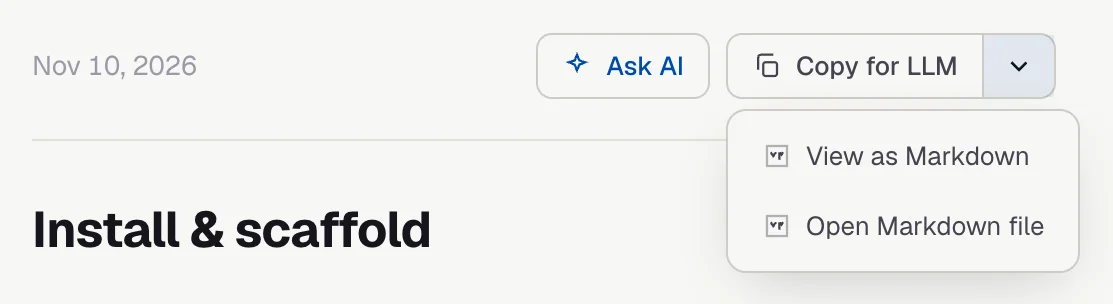
These two were taken with layout.pageActions: "menu" and a last_updated
date on the page. The site has Ask AI set up; without it, there's no Ask AI
button, and the inline row starts at Copy for LLM.
Where the Markdown comes from
Both styles use the page's own .md file, fetched when the pointer or
keyboard focus first reaches the actions, so they work on a static export.
Until it has loaded, or if there's no .md file, they use the text of the
page as rendered.
Where they show
On docs pages only: not on landing pages, hub pages or changelog pages. The API reference has its own actions on each section, the same in either style.
The setting applies to the whole site. A page can't change it, and the actions can't be added to, removed or reordered.